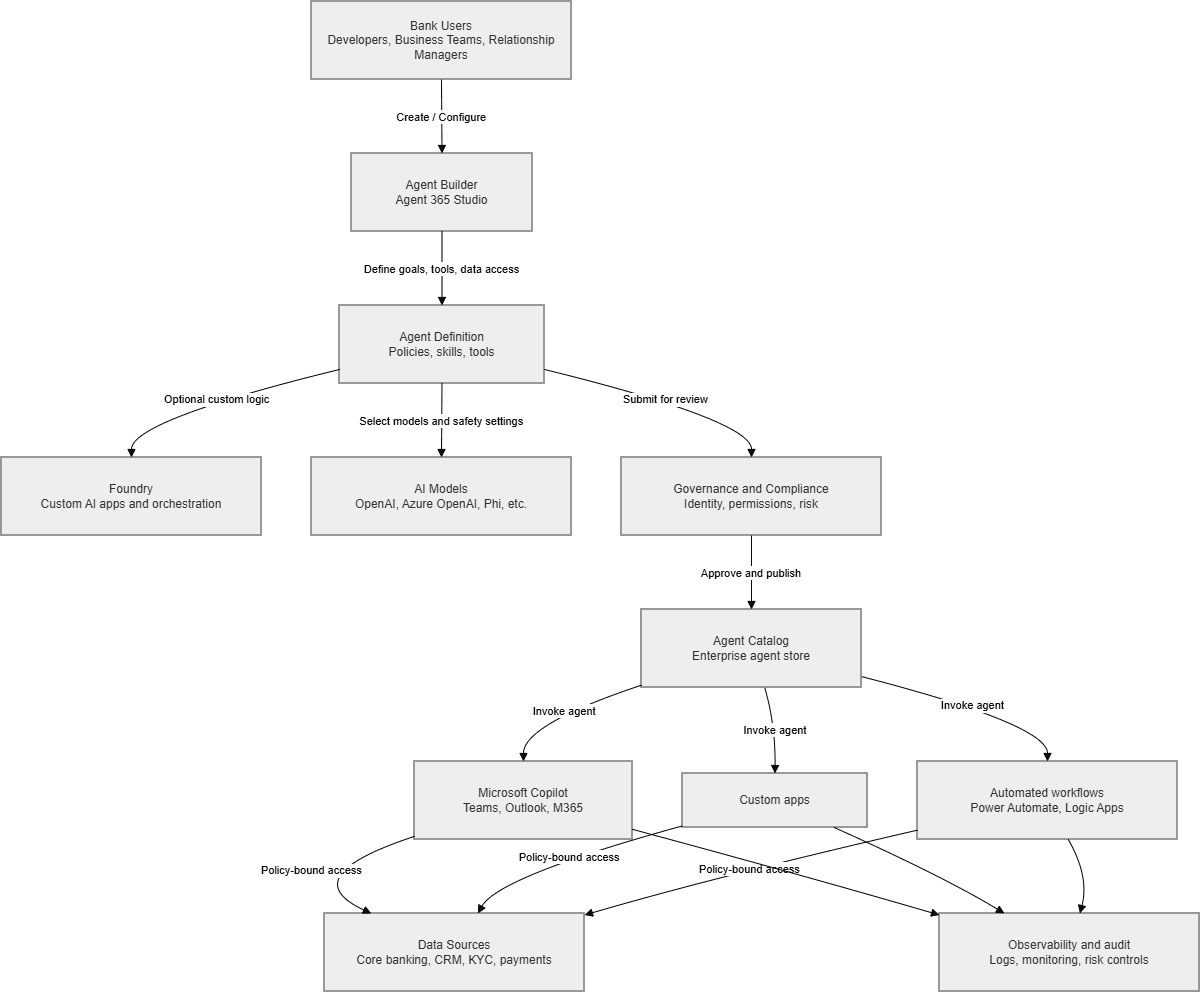

Agent 365 is highly suitable for firms deploying AI, because it provides a unified, enterprise‑grade control plane for AI agents with strong governance, observability, and security. It enables compliant banking use cases while addressing regulatory, networking, and security risks through Microsoft’s identity, access, and monitoring stack.
Agent 365 is Microsoft’s enterprise control plane for managing AI agents, giving IT and security teams one place to govern, monitor, secure, and lifecycle‑manage all AI agents used across the organization. It applies the same identity, compliance, and access controls used for employees—critical for regulated industries like banking.
For banks, this solves a major challenge: AI adoption is accelerating, but regulators demand auditability, data protection, and strict operational controls. Agent 365 provides these guardrails natively.
Key reasons Agent 365 fits a bank:
For a private bank with sensitive client data, this combination of innovation + control is strategically valuable.
Agent 365 enables both customer‑facing and internal AI agents. Examples include:
Customer‑Facing Use Cases
Existing patterns of integration show how banks can deploy domain‑specific agents across Outlook, Teams, and other Microsoft apps while maintaining compliance.
Internal Productivity Use Cases
IT & Security Use Cases
Strategic Benefits
Technical Benefits
Agent 365 addresses many concerns natively, but Banks should evaluate:
Identity & Access
Data Protection
Network Security
Compliance
Governance is key: Agent 365 as the foundation for its AI strategy, starting with controlled pilots in:
This approach balances innovation, security, and regulatory readiness.
| Workstream | What Needs to Happen | Who Owns It | Effort / Headcount Reality |
| 1. Governance Framework | Define agent policies, approval workflows, risk tiers, and usage boundaries. | Risk, Compliance, IT Governance | 0.5–1 FTE initially; ongoing quarterly reviews. |
| 2. Identity & Access Setup | Configure agent identities, least‑privilege roles, conditional access, and lifecycle rules. | IAM / Entra ID Team | 1 IAM engineer for setup; light ongoing maintenance. |
| 3. Data Access & Security Controls | Map which agents can access which systems; configure DLP, network filtering, and Purview policies. | Security, Data Governance | 1 security engineer + 1 data governance analyst. |
| 4. Agent 365 Platform Configuration | Stand up the Agent 365 environment, catalogues, policies, monitoring, and admin roles. | M365 Platform Team | 1 M365 admin for setup; low ongoing overhead. |
| 5. Monitoring & Audit Setup | Configure logging, dashboards, audit trails, and alerting for agent activity. | Security Operations (SOC) | 0.5 FTE SOC analyst ongoing. |
| 6. Foundry / Custom Logic Integration | Build custom workflows, orchestrations, and advanced logic for internal agents. | Engineering / Data Science | 1–2 developers depending on complexity. |
| 7. Business Use Case Onboarding | Identify use cases, run pilots, train business teams, and manage adoption. | Business Product Owners | 1 business lead per use case; part‑time. |
| 8. Change Management & Training | Train staff, create usage guidelines, and manage rollout communications. | Change / Training Team | 0.5 FTE change manager for rollout. |
| 9. Ongoing Agent Lifecycle Management | Review inactive agents, update permissions, retire outdated logic, ensure compliance. | IT Governance + Security | 0.5 FTE ongoing. |

References
| Category | Title | Official Microsoft Link |
| Agent 365 | Agent 365 Overview | https://learn.microsoft.com/microsoft-365/copilot/agent-365-overview
Documentation https://learn.microsoft.com/en-ca/microsoft-agent-365/ GitHub |
| Agent 365 Governance & Security | https://www.microsoft.com/en-us/microsoft-agent-365
Microsoft 365 agents deployment checklist https://learn.microsoft.com/en-ca/microsoft-365/copilot/agent-essentials/m365-agents-checklist |
