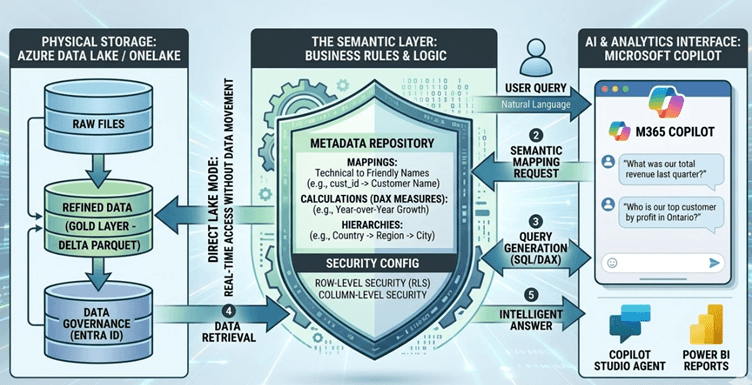
- Definition: What is a Semantic Layer?
A Semantic Layer is a business representation of corporate data that helps end users and AI agents access data autonomously using common business terms. It sits between the physical data storage (Data Lake) and the reporting/AI tools (Copilot).
- The Translation Bridge: It maps complex database schemas, technical table names, and raw relationships into concepts like “Profit Margin,” “Fiscal Year,” and “Active Subscriptions.”
- The Single Source of Truth: It ensures that when three different departments ask Copilot for “Revenue,” they all receive the same calculated number based on a unified logic.
- The Logic: How It Works in Azure
The semantic layer doesn’t store data; it stores metadata the “rules” for the data. In the modern Azure “Medallion” architecture (Bronze/Silver/Gold), the semantic layer typically points to the Gold Layer (the refined, business-ready data).
The Core Logic Components:
- Relationships: Defining how a “Sales” table connects to a “Date” or “Customer” table (e.g., 1-to-many).
- Calculations (Measures): Using DAX (Data Analysis Expressions) to define logic. Instead of Copilot guessing how to calculate Year-over-Year growth, the logic is pre-defined.
- Hierarchies: Grouping data so Copilot understands that “Toronto” is inside “Ontario,” which is inside “Canada.”
- Security (RLS): Row-Level Security ensures that if a Bunzl rep in London asks Copilot for sales data, they only see UK results, even if the Data Lake contains global data.
- Implementation: Mapping the Semantic Layer in Azure
There are two primary ways to implement this in Azure to support Copilot: Power BI Semantic Models (via Microsoft Fabric) or Azure Analysis Services.
Step 1: Data Lake Preparation (OneLake / ADLS Gen2)
Data is stored in Delta Parquet format. This is “Open” data that remains in your lake, but it is structured enough for a semantic engine to read it without moving it.
Step 2: Defining the Model (Power BI / Fabric)
Using Power BI Desktop or the Fabric Web Editor, developers build the “Semantic Model”:
- Direct Lake Mode: A breakthrough feature where the semantic layer reads directly from the Data Lake without “importing” or “refreshing” data. This provides real-time AI analysis.
- Logic Mapping: Developers rename technical columns (e.g., TRX_AMT) to friendly names (Transaction Amount).
Step 3: Enabling Copilot Grounding
Once the model is published to the Power BI Service, it becomes the “Knowledge Base” for Copilot.
- In Power BI: Copilot for Power BI uses this model to generate reports.
- In Copilot Studio: You can “ground” a custom agent on this semantic model. When a user asks a question, Copilot sends a request to the semantic model, which translates the question into a SQL or DAX query, runs it against the Data Lake, and returns the answer.
- How Copilot Interacts with the Layer
When a user asks: “What was our top-selling product in Ontario last month?”
- Natural Language Processing (NLP): Copilot identifies the intent (Analysis) and the entities (Product, Region: Ontario, Time: Last Month).
- Semantic Mapping: Copilot looks at the Semantic Layer’s metadata. It sees that “Ontario” is a value in the Province column and “Top selling” refers to the Total_Sales measure.
- Query Generation: Copilot generates a query based on the Semantic Layer’s rules, not the raw file structure.
- Data Retrieval: The Semantic Layer executes the query against the Azure Data Lake.
- Response: The result is passed back to Copilot, which summarizes it: “Your top-selling product in Ontario was the Eco-Cup, with $50,000 in sales.”
Summary Table: Implementation Checklist
| Layer |
Responsibility |
Implementation Tool |
| Physical Storage |
Raw & Refined Files |
Azure Data Lake Storage (ADLS) / OneLake |
| Logic & Schema |
Relationships & Calculations |
Power BI Semantic Model / Tabular Editor |
| AI Interface |
Natural Language Querying |
Microsoft 365 Copilot / Copilot Studio |
| Security |
Access Control |
Entra ID & Row-Level Security (RLS) |