
A Service Endpoint allows your VNet’s identity to reach an Azure service (such as Storage or SQL Database) through Microsoft’s backbone network. Traffic doesn’t pass through the public internet, but remains within Microsoft’s network, encrypted and isolated from the wider web.
Nevertheless, the Azure service itself still exposes a public endpoint (a public IP). Your subnet just gets permission to use it directly.
Think of it this way: your team uses the main front door of the building (the public endpoint), but the security guard at the door knows your team and lets you in while denying entry to anyone else.
Advantages:
Disadvantages:
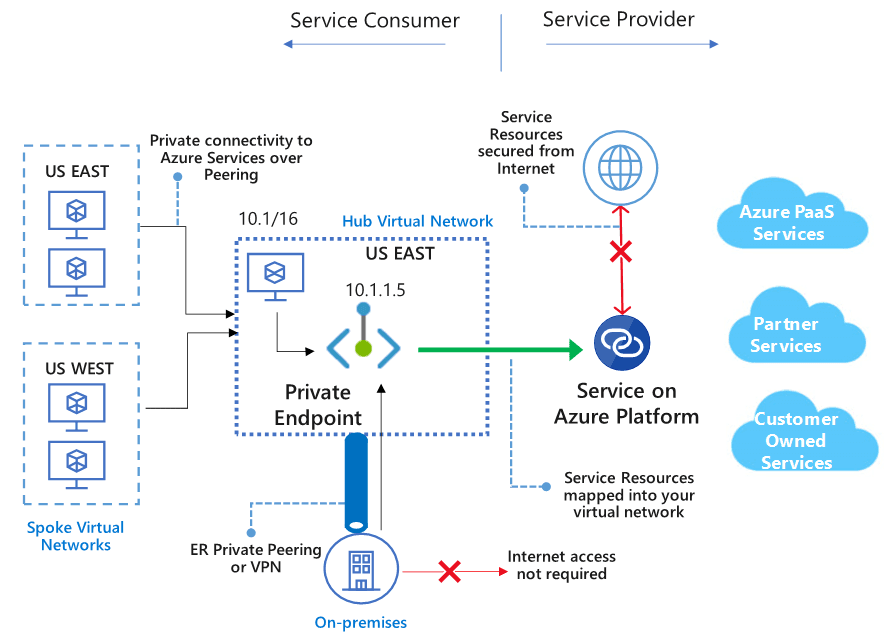
A Private Endpoint takes it one step further. It creates a private IP address inside your VNet that connects directly to the Azure service through Azure Private Link. This means that traffic never touches a public IP, not even Microsoft’s own shared front doors.
In other words, your service becomes part of your private network. It is not exposed to the public internet. It’s like having a locked side door only your internal team can use.
However, in real-world scenarios, it’s not as simple as plug-and-play to set this up. The following items must be configured:
mydb.database.windows.net) that will point to the private endpoint IP rather than the public one.If the DNS is not well configured, the workloads may still attempt to connect to the public endpoint, which means that the whole idea will be wasted.
Pros:
Cons:
