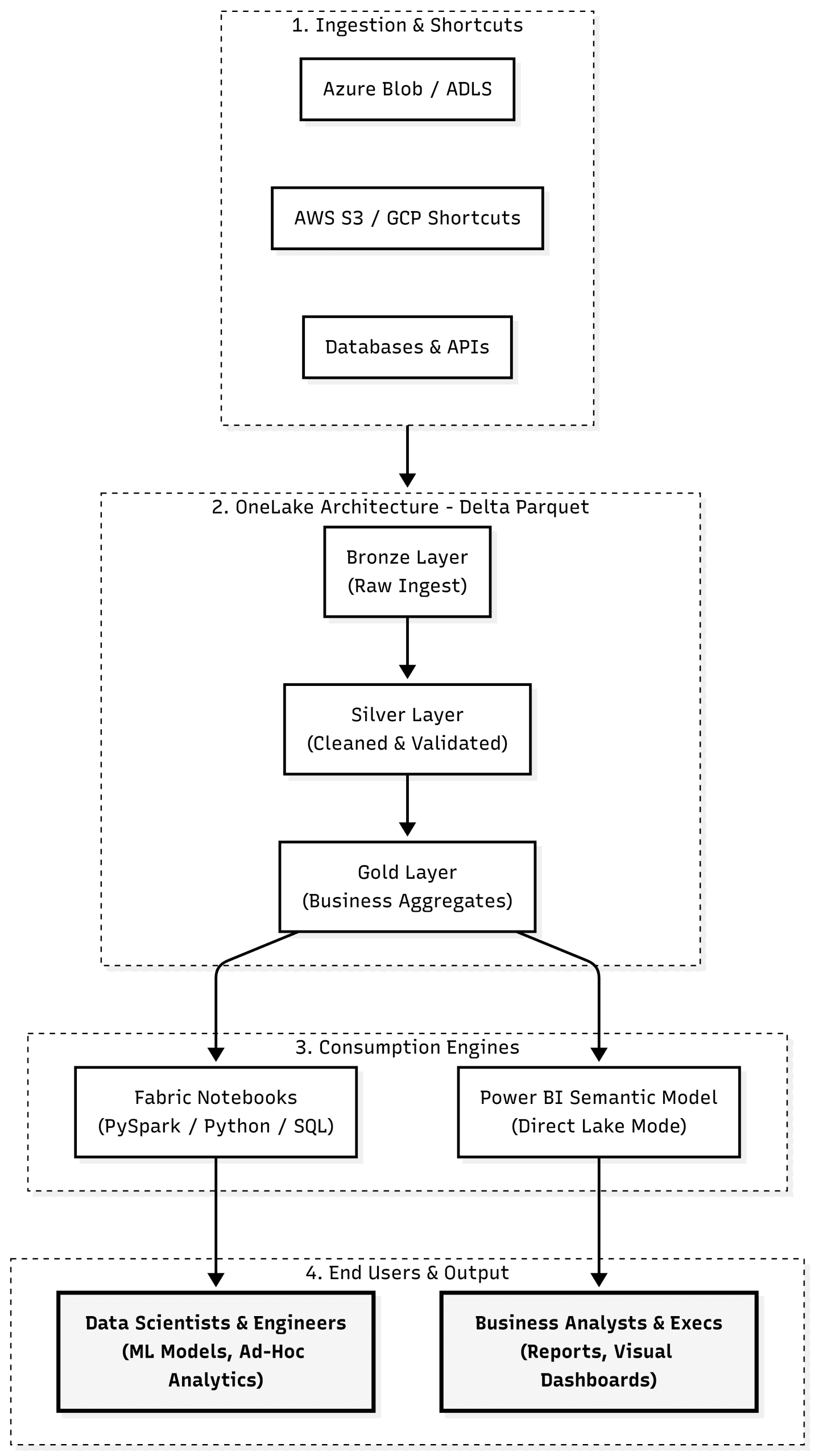
The above conceptual diagram illustrates a modern, unified data platform that streamlines ingestion, processing, and consumption across two primary enterprise personas: Data Scientists / Engineers using interactive notebooks and Business Analysts / Executives consuming Power BI dashboards.
What is a “Data Lake” vs. “OneLake”?
Traditional Data Lake (e.g., ADLS Gen2, AWS S3):An Infrastructure-as-a-Service (IaaS) storage tier. You provision accounts, manage networking boundaries, configure firewalls, partition directories, and set up distinct role-based access control (RBAC) across multiple subscriptions. Each department typically creates its own isolated data lake, resulting in fragmented data silos and redundant copies.
Microsoft Fabric OneLake: A single, unified Software-as-a-Service (SaaS) lake for the entire organization frequently called the “OneDrive for data.” OneLake comes pre-provisioned with your Microsoft Fabric tenant. There is no infrastructure to stand up. All workspaces, compute engines, and business units share one hierarchical namespace, governed under a single security and compliance perimeter. Storage is standardized natively on open-format Delta Lake (Parquet) files.
How Data Moves Through the Architecture
Ingestion & Zero-Copy Shortcuts: Instead of building complex extract-transform-load (ETL) pipelines to move data from external clouds, OneLake uses Shortcuts. Shortcuts are metadata pointers to data located in Azure Data Lake Storage, AWS S3, or Google Cloud Platform. Data remains in place but appears as local tables in OneLake without data movement charges or duplication.
The Medallion Processing Core: Within a Fabric Lakehouse, data is organized using the Medallion pattern:
Bronze: Raw historical files and external landing data.
Silver: Deduplicated, cleansed, and conformed records transformed via PySpark or SQL.
Gold: Curated, dimensional business-ready tables optimized for consumption.
Consumption Without Moving Data:
Fabric Notebooks: Data engineers and machine learning teams attach managed PySpark or Python notebooks directly to OneLake files for feature engineering, model training, and ad-hoc exploratory analysis.
Power BI (Direct Lake Mode): Unlike traditional Import Mode (which duplicates data into cache) or DirectQuery (which translates visuals into slow SQL queries), Direct Lake Mode reads Delta Parquet files directly from OneLake storage straight into the Power BI engine. Queries run with in-memory performance without data duplication.
How to Move from an Existing Data Lake to OneLake
Migrating an existing data lake (such as ADLS Gen2 or AWS S3) into OneLake does not require an immediate “rip-and-replace” migration. A pragmatic enterprise transition follows three steps:
Step 1: Create Zero-Copy Shortcuts (Day 1 Value)In a Fabric workspace, open a Lakehouse and select New Shortcut. Point the shortcut to your existing ADLS Gen2 or S3 paths. Your existing data immediately becomes visible and queryable inside Fabric without moving a single byte or disrupting legacy pipelines.
Step 2: Standardize on Delta Parquet OneLake requires structured data to be in Delta format to unlock Fabric’s analytical engine optimizations. If your existing lake already uses Delta Lake, Fabric reads it instantly. If your data is in raw CSV, JSON, or standard Parquet, use Fabric Data Factory pipelines or PySpark notebooks to convert raw files into Delta format in the Silver/Gold layers.
Step 3: Point Consumers to Fabric Services
Switch Power BI semantic models from traditional Import/DirectQuery to Direct Lake pointing at your Gold tables.
Shift notebook workloads and scheduled pipelines from standalone Databricks or Synapse instances to native Fabric Notebooks and Spark jobs.
Step 4: Decommission Redundant Ingestion (Phase Out)As upstream systems are updated, point source ingest jobs directly to Fabric Lakehouses or OneLake endpoints, eventually deprecating intermediate external storage accounts.